Automated Docs
The libary (or package) document helps its users quickly get its usage. And the docs should be generated automatically from the source code.
Golang and Rust have their own commands to extract docs from the doc comment inside the source code. doxygen is a tool that can generate docs from kinds of source files: c, c++, c#, object-c, python and so on.
The following will be illustrate:
- go doc
- rust doc
- c language doc
Go Doc Comments
Golang can extract docs from doc comments
in the source code. go doc command prints the doc in
the console and godoc just start a http server to
provids html pages for the docs. Here is an example:
> cat hello.go
// package hello illustrate go doc usage
package hello

import (
        "fmt"
)

// SayHello just prints the string "hello"
func SayHello() {
        fmt.Println("hello-lo!")
}

> go doc hello.SayHello
package hello // import "hello"

func SayHello()
    SayHello just prints the string "hello"
Rust Doc Comments
Rust supports to generate html files from the doc comments in the source files. It also supports to “test” the “exmaple code” inside the doc comments and this feature helps to avoid invalid docs.
useful links: Making Useful Documentation Comments
An example:
> type src\lib.rs
/// A human being is represented here
pub struct Person {
    /// A person must have a name, no matter how much Juliet may hate it
    pub name: String,
}

impl Person {
    /// Returns a person with the name given them
    ///
    /// # Arguments
    ///
    /// * `name` - A string slice that holds the name of the person
    ///
    /// # Examples
    ///
    /// ```
    /// // You can have rust code between fences inside the comments
    /// // If you pass --test to `rustdoc`, it will even test it for you!
    /// use docs::Person;
    /// let person = Person::new("name");
    /// ```
    pub fn new(name: &str) -> Person {
        Person {
            name: name.to_string(),
        }
    }

    /// Gives a friendly hello!
    ///
    /// Says "Hello, [name](Person::name)" to the `Person` it is called on.
    pub fn hello(& self) {
        println!("Hello, {}!", self.name);
    }
}

fn main() {
    let john = Person::new("John");

    john.hello();
}

> cargo doc
Documenting docs v0.1.0 (D:\proj\rust\docs)
    Finished dev [unoptimized + debuginfo] target(s) in 0.54s

> cargo test --doc
    Doc-tests docs

running 1 test
test src\lib.rs - Person::new (line 16) ... ok

test result: ok. 1 passed; 0 failed; 0 ignored; 0 measured; 0 filtered out; finished in 0.54s
C Language Doc comments
We can use doxygen to generate docs.
Doxygen is a command line based utility that help to generate docs from kinds of source files. We need to write doc comments according to the rule of doxygen. Then doxygen will generate html files that containing docs.
> type hello.c
/** @file
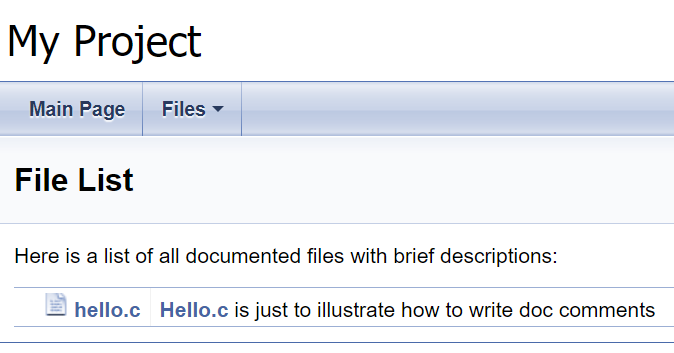
* hello.c is just to illustrate how to write doc comments.
*
* Just follow the rules of doxygen.
*
*/
#include <stdio.h>

/**
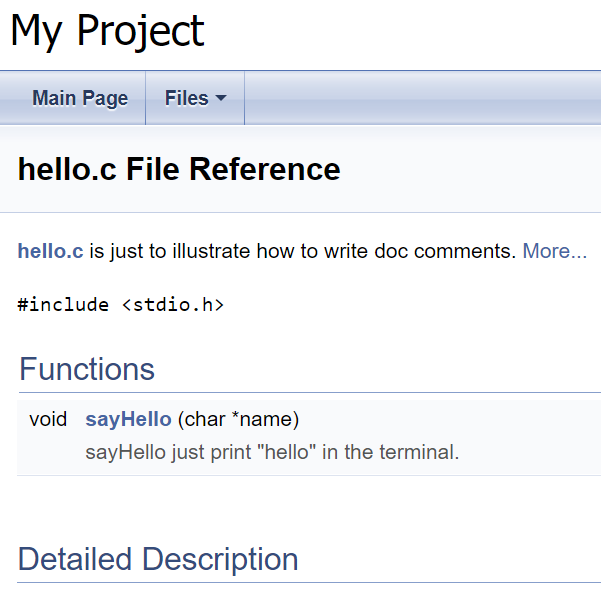
* sayHello just print "hello" in the terminal.
*
* It will get the name from the parameter and say hello to him/her.
*
* @param name say hello to the one with that "name".
*
*/
void sayHello(char* name) {
        printf("hello, %s\n", name);
}

> doxygen -g config.txt
Configuration file 'config.txt' created.
> doxygen config.txt
Here we will get docs inside the html dir. Open the doc, we we get the following: